Map catalog
In the card catalogue, you will find all the card folders from your organisation, sorted by category. Here you can choose between the Catalog view  with thumbnails or a Table View
  switch back and forth.
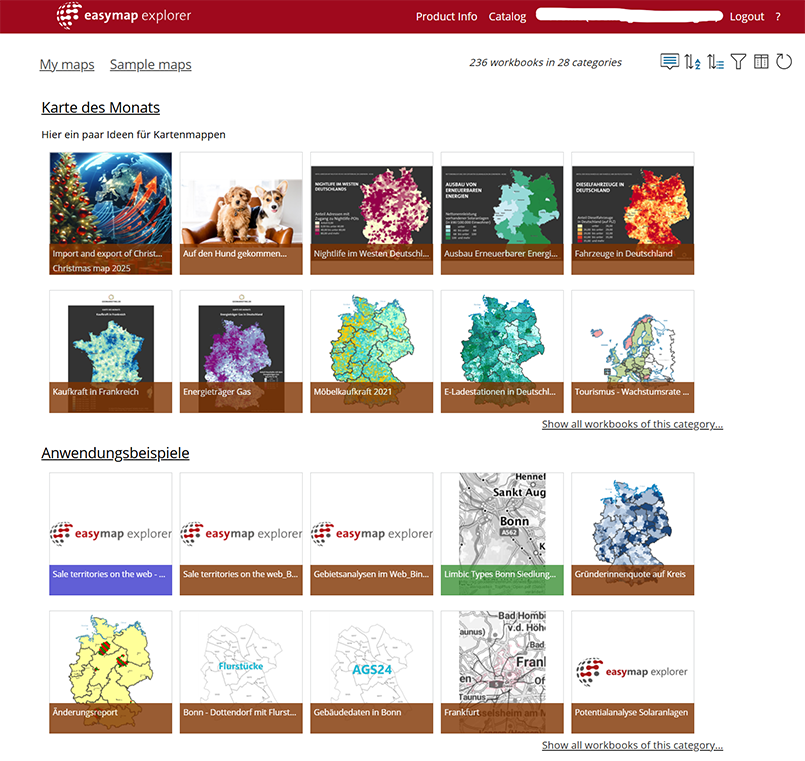
By clicking on the thumbnails, you can go directly from the card catalogue to the card view, and by clicking on the Info icon  You will first be taken to the description of the map folder. This icon appears when you hover your mouse over the map you wish to access.
Under ‘My maps’, you can click on Add a notification insert a general notification or edit an existing one. You can also, by clicking on Sort categories
 Define a description for each section. Only users with administrator rights can edit and delete notifications.
Filter options

|
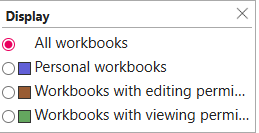
After clicking on the filter icon, you can choose to filter by personal, shared for editing or shared for viewing map folders. |
|
Sort map catalog
In the internal section (or the administrators’ section) of the map catalogue, you can sort map folders and categories. The sort order you set applies to all users of easymap explorer.

|
Once you have clicked on this icon, you can specify the order of the card folders within a category. When a new category is created, it is initially placed at the very end of the list. | 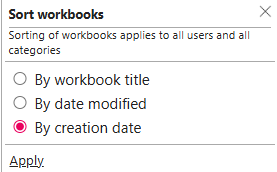
|

|
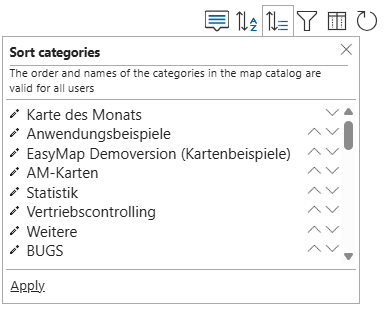
After clicking on this icon, the sorting of the rubrics in the card catalog can be defined. With the arrows it is possible to move rubrics down or up. In addition, the name and description of a card folder can be adjusted or deleted by clicking on the pencil. Note: The order and names of the headings in the card catalog apply to all users. |
|
