Calculate route
Calculate the exact distance between two or more points. This will help you refine your analyses, maps and optimisations.
Creating a route
Route planning
To create a new route, select the Calculate route option from the Edit menu. A new window will open, in which you will need to specify your choice of transport and route type.
The following means of transport are available:
- Car
- Truck
- Bicycle
- Pedestrian
You can also choose between the following calculation types:
- shortest travel distance.
- fastest travel time.
Note: Please note that not all combinations can be selected.
When you have confirmed the selection by Ok, your mouse now has a [] next to your mouse pointer. You can now click on two to any number of points on the map to add them to the route. The order in which you select the points plays a decisive role.
You receive a message in the status bar in easymap the travel distance and travel time. 
If you wish to start a new route, you can press ESC to end the current route and repeat the process.
Save as graphic
If you need to use the routes frequently and/or would like to save and store them, you can save the route as an image and add it to your easymap Attach project.
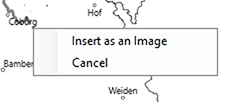
To do this, create a route and then, instead of selecting ‘Exit’, use the context menu to save the diagram.
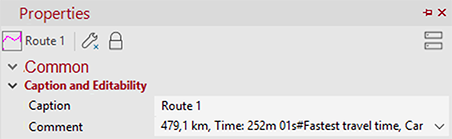
You will then get a graphic in the Contents control window that includes your route. In the properties of the graphic, you can now see which calculation type and means of transport you had selected.
Also the distance and travel time can be seen here again. You also have the option of assigning a new color to the route.
 .
.
Note: Please note that you can move the graphic or resize it. If you do so, it will no longer reflect reality.
The available options are determined by the license you have purchased. This function is only available if you use the extensioneasymap office pro or easymap professional. For each object drawn, credits are deducted from your quota. The more data records your table contains, the more credits will be deducted.
